Anmelden
WhatsApp Business Nutzung HubSpot
25 Klicks
Tutellus
¡Reserva ya!
Crypto / Bitcoin trading
25 Klicks
Test Campaña curso
¿Cómo puedo ayudarte?
Education
25 Klicks
Carlos Vargas
Carlos Vargas
IT / Technology
25 Klicks
Recomienda un libro
Libros recomendados cada semana
25 Klicks
Bot Tools (New)
How can I help you?
IT / Technology
25 Klicks
ChatWith.io
This is test message
Agency / SEO / Design
25 Klicks
Widget 1
Use our WhatsApp account for support and sales
Agency / SEO / Design
25 Klicks
Connaughts
Use our WhatsApp account for support
25 Klicks
Aceros Villarreal
¡Hola! ¿Cómo puedo ayudarte?
Sonstiges
25 Klicks
Maternify flyer 2023
¿Cómo puedo ayudarte?
Healthcare
24 Klicks
Clean Theme Landing Page
International Bike shop located all over the globe
24 Klicks
Support
Hi!
Vorherige
1
…
64
65
66
67
(current)
68
69
70
…
138
Nächste
Fügen Sie das Widget auf Ihrer Website hinzu
1. Kopieren Sie diesen Code
Ihr Widget-Code
Code kopieren
In die Zwischenablage kopiert
oder Ihre Schlüsselnummer (
Learn how to add your Widget to your Wordpress website
)
Schlüsselnummer kopieren
In die Zwischenablage kopiert
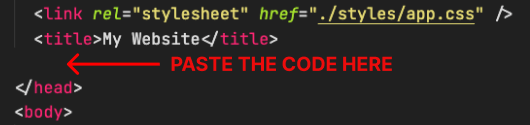
2. Fügen Sie den Code ein
Platzieren Sie den Code direkt vor dem </head>-Tag im HTML Ihrer Website