Anmelden
WhatsApp Business Nutzung WhatsApp API

14 Klicks
Widget Asrila
Silahkan tanyakan CS kami perihal Konveksi
Local business
14 Klicks
TEGROUP
Use our WhatsApp account for support and sales
14 Klicks
CortinasDecor® Piura
Contáctenos Ahora!
Local business
14 Klicks
My Widget
Use our WhatsApp account for support and sales
14 Klicks
christian.hopkins
Use christian.hopkins's Widget for making bookings
Technology / Mobile
14 Klicks
contacto.tonymoreno
¿Cómo puedo ayudarte?
Education
14 Klicks
WhatsApp SANO Mairena
CHATEA CON UN ESPECIALISTA
Trainning / Sports / Yoga
14 Klicks
60 Minuten Marketing
Lass uns deine Fragen beantworten...
Agency / SEO / Design
14 Klicks
Widget para Ventas
¿Cómo puedo ayudarte?
IT / Technology
14 Klicks
TF Santosh
www.tableandforkconsultant.com
14 Klicks
Widget para Reservas
¡Reserva ya!
IT / Technology
14 Klicks
MiAppMovil
¿Cómo puedo ayudarte?
Agency / SEO / Design
Vorherige
1
…
322
323
324
325
(current)
326
327
328
…
552
Nächste
Fügen Sie das Widget auf Ihrer Website hinzu
1. Kopieren Sie diesen Code
Ihr Widget-Code
Code kopieren
In die Zwischenablage kopiert
oder Ihre Schlüsselnummer (
Learn how to add your Widget to your Wordpress website
)
Schlüsselnummer kopieren
In die Zwischenablage kopiert
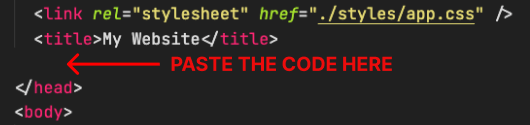
2. Fügen Sie den Code ein
Platzieren Sie den Code direkt vor dem </head>-Tag im HTML Ihrer Website